

Meet the AFmeals Nutrition Tracker: How It Works
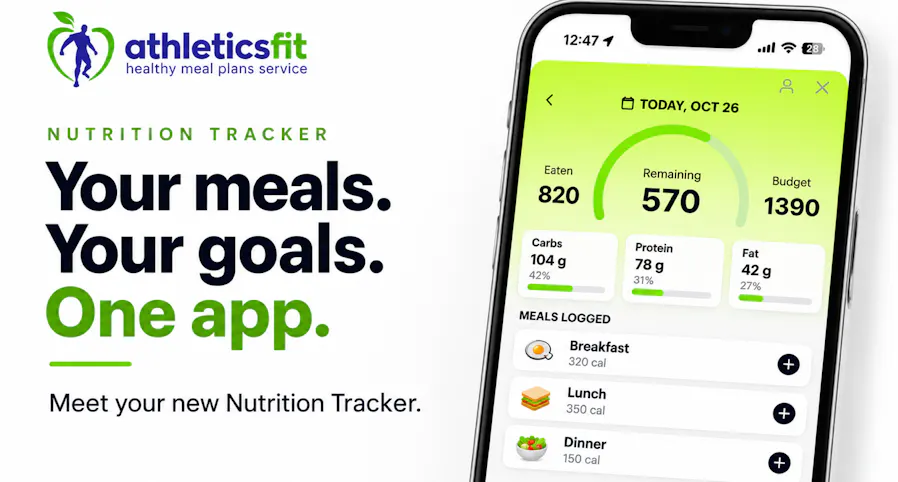
Meet the new AFmeals Nutrition Tracker. Set nutrition goals, log AthleticsFit meals, track other foods with AI, and review daily calories and macros.
TL;DR: The AFmeals Nutrition Tracker lets you set daily calorie and macro goals, add your AthleticsFit Meals orders to a daily log, track other foods with AI, and see everything in one dashboard. It is free for all AFmeals app users.
Keeping track of what you eat can mean entering every meal by hand, switching between apps, and guessing how your day adds up. The Nutrition Tracker in the AFmeals app builds a personalized calorie budget from the information you enter, then shows calories eaten, calories remaining, and your protein, carbohydrate, and fat totals as you log. Your recent AthleticsFit Meals orders are already in the app, so you do not have to type in their nutrition numbers.
Whether you are training for a Miami half marathon or just trying to eat more intentionally, here is how it works.
What can you do with the AFmeals Nutrition Tracker?
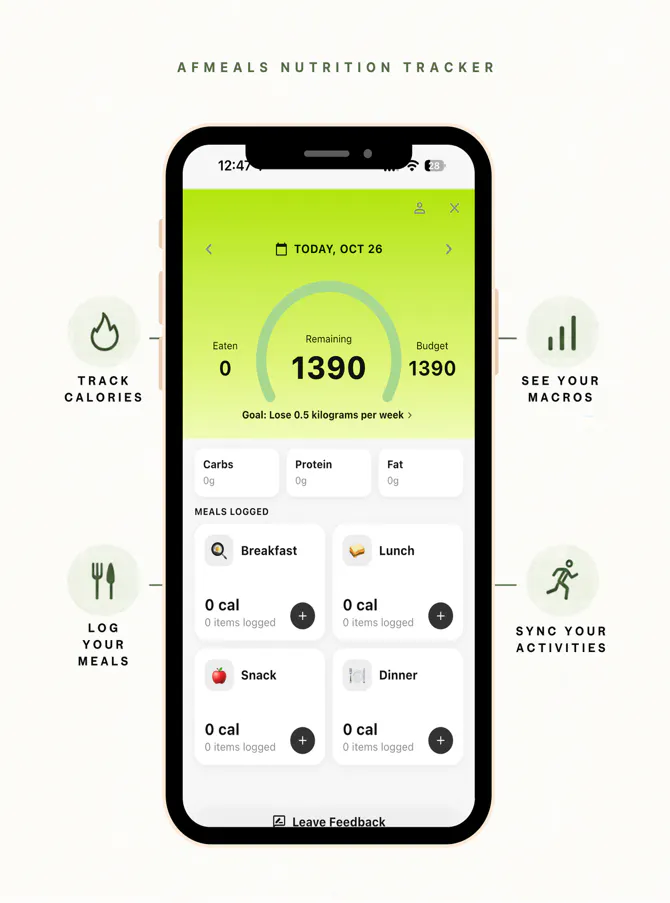
- Set a personalized daily calorie budget and daily protein, carbohydrate, and fat targets.
- Add AthleticsFit Meals from your orders in the last 30 days without entering their nutrition information by hand.
- Use Track with AI to estimate nutrition for other foods from a photo or description.
- Connect Apple Health or Google Health to compare calories spent with calories eaten.
- Review calories and macros for any day on one dashboard.
AI-generated nutrition information is an estimate. Review it before adding it to your log. The tracker is a convenience tool: it does not guarantee any particular result.
What does the dashboard show?
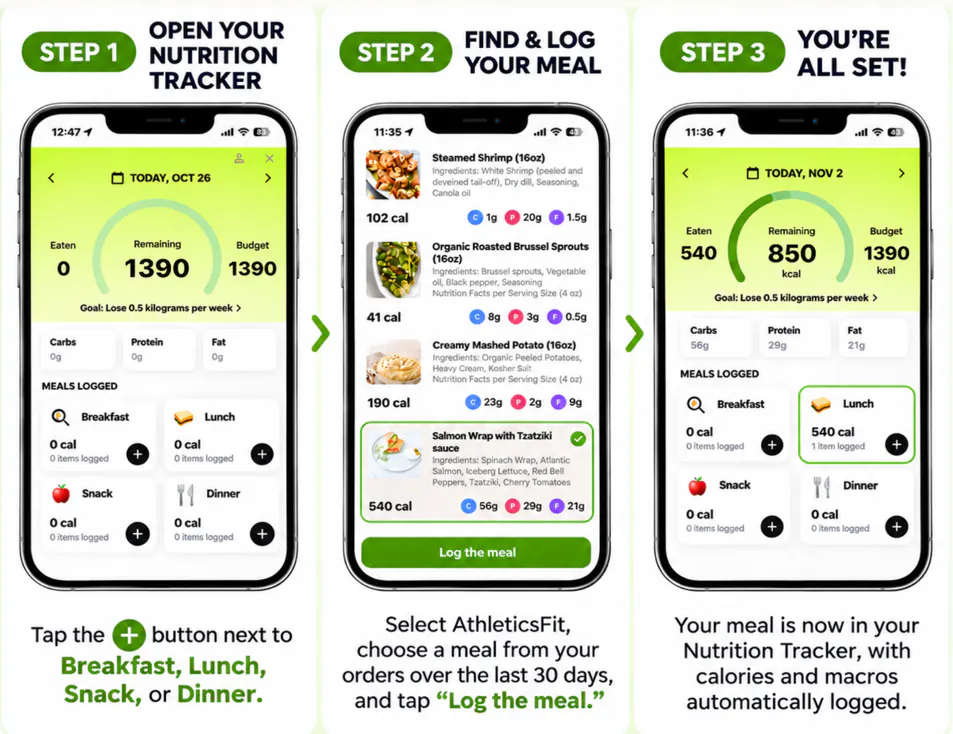
The dashboard organizes your food log by meal: breakfast, lunch, snack, and dinner, each with its logged calories and item count. At the top you see your daily calorie budget, calories eaten, and calories remaining, plus carbohydrate, protein, and fat totals. As you add food, the totals update, and the date controls let you review any other day.
How do you set up the Nutrition Tracker?
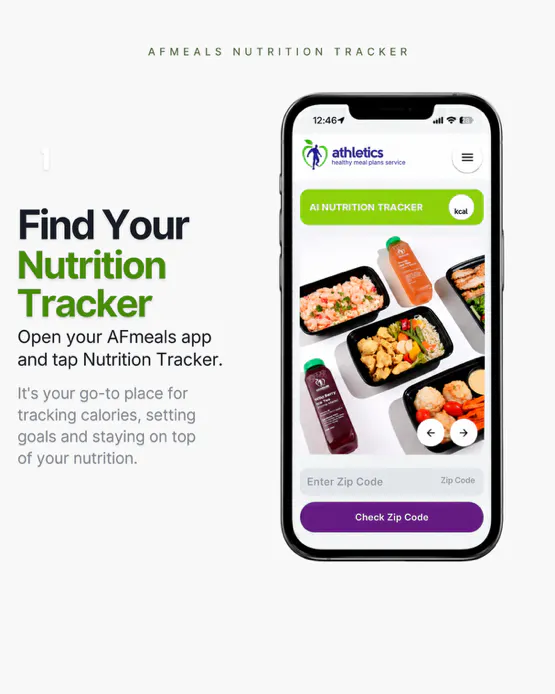
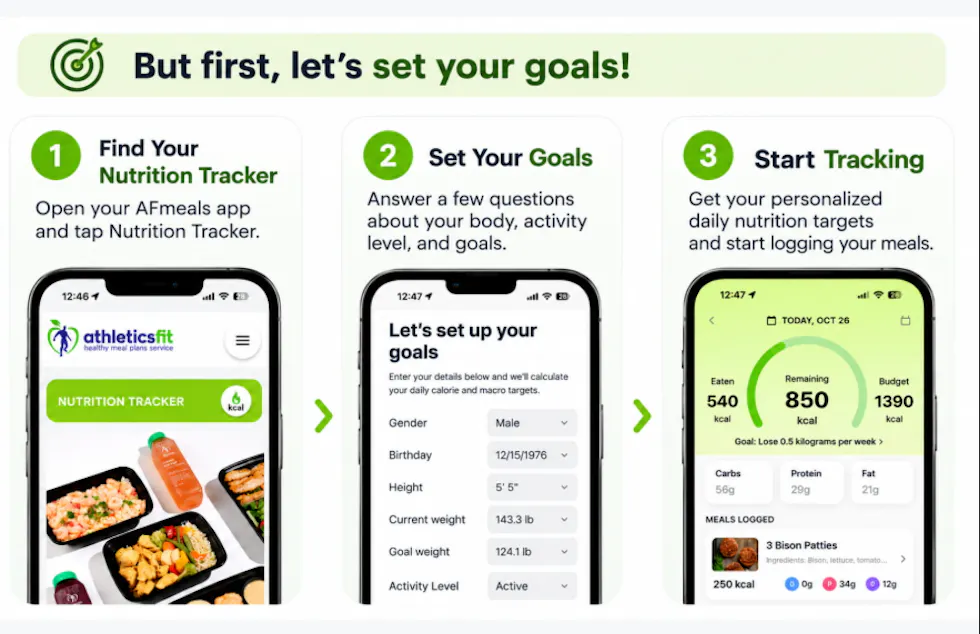
- Open the AFmeals app and tap Nutrition Tracker.
- Enter your profile and goal details: gender, birthday, height, current weight, goal weight, activity level, and goal pace.
- Review your information and confirm.
- Review your personalized daily calorie budget and set your protein, carbohydrate, and fat targets.
- Return to the dashboard and start logging.
Your calorie budget is based on the information you enter. The tracker is a planning tool, not a medical prescription. For guidance tailored to your health needs, speak with a qualified health professional.
How do you log an AthleticsFit meal?
AthleticsFit Meals you received in the last 30 days appear in the app, grouped by delivery date, with calories and macros already listed. The meals available depend on your recent orders.
- On the Nutrition Tracker dashboard, tap the + button next to Breakfast, Lunch, Snack, or Dinner.
- Choose AthleticsFit.
- Select a meal from your orders in the last 30 days.
- Tap Log the meal.
- Your meal appears in your log, with its calories and macros added to your daily totals.
How do you track other foods with AI?
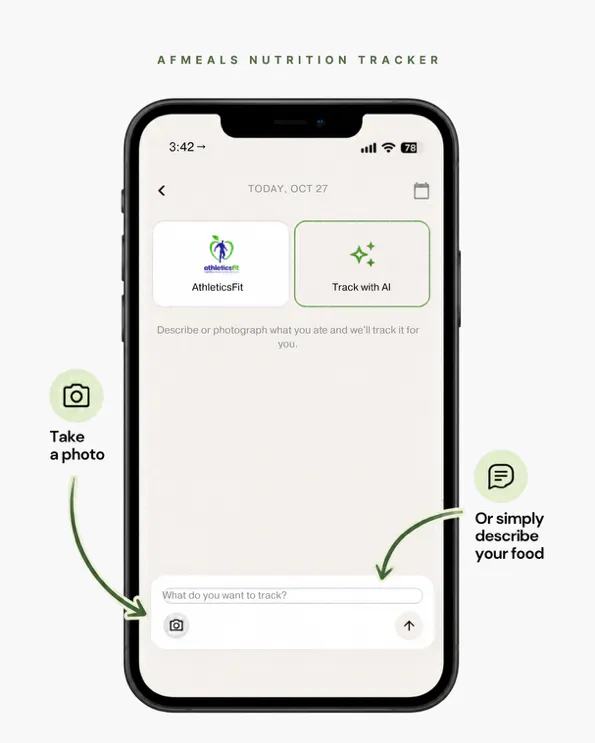
For a coffee run on Brickell or dinner out in Wynwood, choose Track with AI. Take a photo of the food or describe it, then review the nutrition estimate before adding it to your log. The estimate may not be exact, so check that the food and numbers look right before you log it.
How does connecting your activity app help?
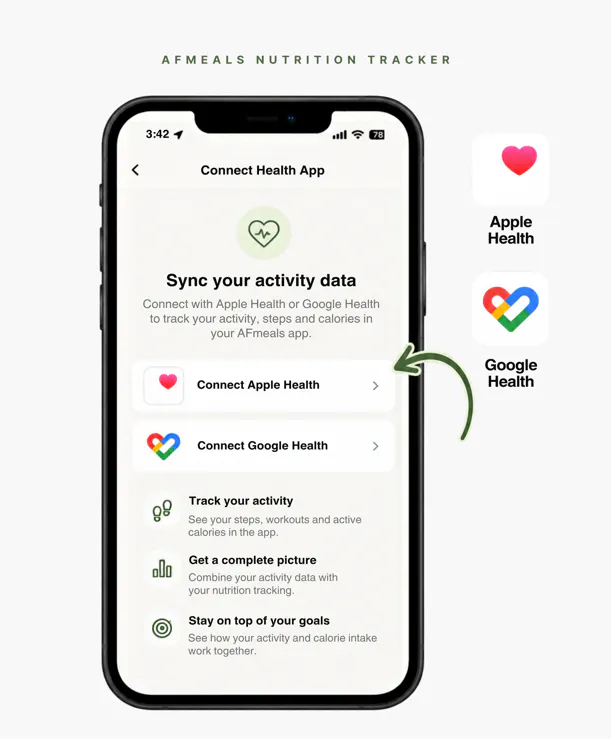
Connect Apple Health or Google Health and you can sync your activity to see calories spent next to calories eaten. That gives you a clearer picture of your day, so you can set your total calorie target with an understanding of how you actually spend energy, rather than guessing.
Open the activity connection option in the AFmeals app, follow the on-screen prompts, and grant the requested permissions. Then check the tracker to confirm your activity has synced.
How do you review your daily nutrition?
Select a day and look at three things: calories (eaten, budget, and remaining), your carbohydrate, protein, and fat totals, and the food entries under each meal. Check the entries to make sure you logged what you intended.
The tracker is built for visibility and convenience. It shows where your day stands so you can make your next meal choice with more information. It is not a substitute for professional nutrition advice.
How do you see your nutrition trends over time?
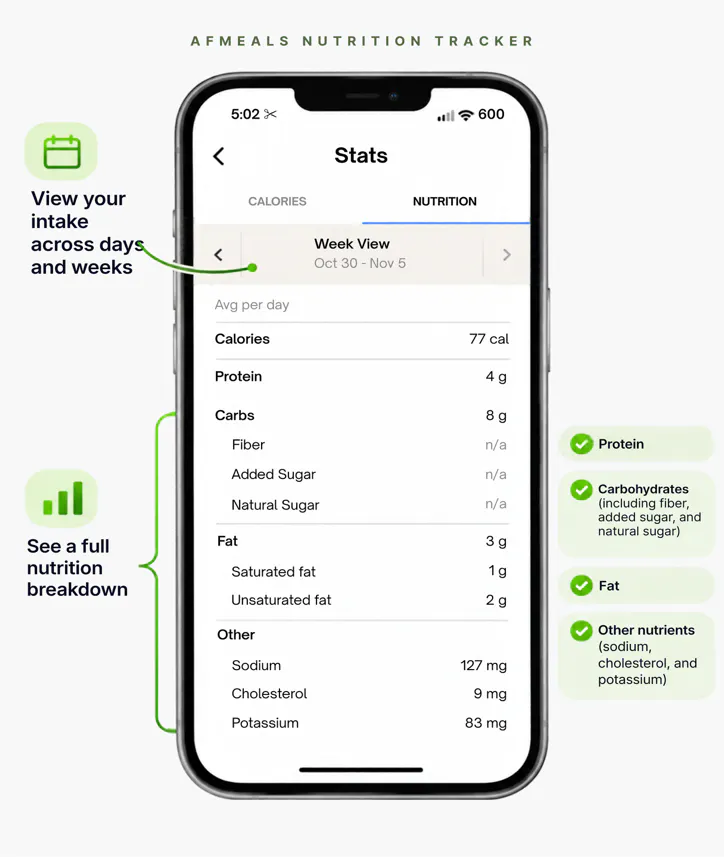
From the main screen, tap Calorie intake to see your intake across days and weeks, plus a full nutrition breakdown for the period you choose.
The breakdown covers:
- Protein
- Carbohydrates, including fiber, added sugar, and natural sugar
- Fat
- Other nutrients: sodium, cholesterol, and potassium
A single day rarely tells the whole story. Looking at weeks or months gives you a fuller, more reliable picture of your nutrition habits than any one day.
Make food tracking easier with AthleticsFit Meals
AthleticsFit Meals serves Miami-Dade, Broward, and Boca Raton, and your orders are ready to log in the AFmeals app. The Nutrition Tracker is free for all AFmeals app users, with or without an AthleticsFit Meals order. Open the app and tap Nutrition Tracker to try it.
New to AthleticsFit Meals? See the plans at afmeals.com. Use code NEWFIT for 20% OFF your first order.
See the plansFrequently asked questions
What is the AFmeals Nutrition Tracker?
It is an in-app feature for setting daily nutrition goals, logging food, and reviewing calories and macros in one dashboard.
Is the Nutrition Tracker free?
Yes. It is free for all AFmeals app users, and you can use it without ordering AthleticsFit Meals. If you do order, your recent meals are ready to add to your log.
Where can I download the AFmeals app and the Nutrition Tracker?
Download the AFmeals app from the App Store or Google Play. The Nutrition Tracker is part of the app, so there is nothing extra to install.
Where do I find it?
Open the AFmeals app and tap Nutrition Tracker.
Can I log meals I ordered from AthleticsFit Meals?
Yes. Meals you received in the last 30 days appear in the tracker, grouped by delivery date, with calories and macros already listed. Select a meal to add it to your log.
Can I track food that is not from AthleticsFit Meals?
Yes. Track with AI can estimate nutrition from a photo or description. AI values are estimates, so review them before adding them to your log.
How is my daily calorie budget calculated?
The app calculates a personalized budget from the details you enter: gender, birthday, height, current weight, goal weight, activity level, and goal pace. It is a calorie target, not medical advice.
What does connecting Apple Health or Google Health do?
It syncs your activity so you can see calories spent next to calories eaten. That gives you a clearer picture of your day when setting your total calorie target.
Does the Nutrition Tracker guarantee weight loss?
No. It helps you record and review what you log, and it does not guarantee weight loss or any other specific result. For personalized guidance, consult a qualified health professional.